Match kWh to kW for Reliable Whole Home Backup in San Diego
Match kWh to kW for Reliable Whole Home Backup in San Diego
For most homeowners in outage-prone areas, whole-home backup is worth the investment if you can afford the $22,000 to $40,000 installed price tag. Expect to need 20 to 40 kWh of usable storage to run an entire house through a multi-day grid failure. If your budget or needs point smaller, a critical-loads setup covering just the essentials costs far less and still keeps the lights, fridge, and internet running.
TL;DR:
- Whole-home backup systems require 20 to 40 kWh of usable storage, but proper sizing must consider both energy capacity and actual power needs.
- Most single batteries provide 5 to 11.5 kW of continuous power, often necessitating stacking multiple units for full house coverage, especially with high-demand appliances.
- Costs for a whole-home backup range from $22,000 to $40,000, depending on capacity, hardware, labor, permits, and panel upgrades, with federal incentives reducing net expenses.
- Installing a backup system involves a detailed site assessment, electrical upgrades if needed, permits, and a quick transition to backup power within 20 to 50 milliseconds during outages.
- Undersized systems most often fail during outages due to circuit surges or underestimated loads, highlighting the importance of a thorough load audit before installation.
Table of Contents
- What Does Whole Home Backup Actually Mean?
- How Many Batteries and How Much Power Do You Actually Need?
- How Much Does Whole Home Backup Cost?
- What Happens During Installation, and How Long Does It Take?
- Battery Backup vs. Generators: Which Makes More Sense?
- How to Choose an Installer and What to Ask For
- How Long Do Whole Home Backup Systems Last?
- Why Do Backup Systems Fail When You Need Them Most?
- How San Diego Solar Approaches Whole Home Backup Projects
- Get a Free Load Audit and Sizing Estimate
- Sources
What Does Whole Home Backup Actually Mean?
The term gets thrown around loosely, and that’s where a lot of homeowners get burned on quotes that don’t match what they actually need. There are three distinct approaches, and confusing them is the fastest way to overspend or underbuy.
A critical-loads subpanel backs up a handful of circuits you choose ahead of time: refrigerator, some lighting, Wi-Fi router, maybe a sump pump. It’s the cheapest path into home energy backup and works well if you mainly want to avoid spoiled food and a dark house.
A whole-panel gateway approach ties the battery system into your main panel through a smart device that manages load in real time. Instead of pre-selecting circuits, the gateway lets you run everything, but it can shed non-essential loads automatically if demand spikes past what the battery can deliver. This is the middle ground, and it’s where a lot of modern systems land.
True whole-home backup means enough stored energy and inverter power to run the entire house, including the air conditioner and electric range, without any load shedding. It’s the most capable option and also the most expensive.
The confusion homeowners run into most often is treating kilowatt-hours (kWh) and kilowatts (kW) as the same thing. They’re not:
- kWh (energy) is how much total capacity you have. Think of it like the size of a gas tank.
- kW (power) is how fast you can draw from that tank. Think of it like the size of the fuel line.
A battery bank with plenty of kWh can still fail to start your air conditioner if it doesn’t have enough kW of continuous or surge output. That distinction drives almost every sizing mistake homeowners make before they call an installer.
How Many Batteries and How Much Power Do You Actually Need?
Sizing starts with an honest look at what you want running during an outage, not what sounds impressive on paper. Three common profiles cover most homes.
Essentials-only backup, the refrigerator, a few outlets, internet, and lighting, typically needs 5 to 10 kWh of usable storage. Most-of-house backup, which adds things like the washer, most outlets, and a window AC unit, usually calls for 10 to 20 kWh. Whole-home with central AC and an electric range is where you land in that 20 to 40 kWh range, and it’s also where power, not just energy, starts to matter more.
Continuous power is what your system needs to sustain steady loads. Surge power is the short burst required to start a motor, and it’s often two to three times higher than the running wattage. Well pumps and central air conditioner compressors are the usual culprits. A system that handles your daily draw fine can still trip offline the moment the AC compressor kicks on, if the inverter wasn’t sized for that surge.
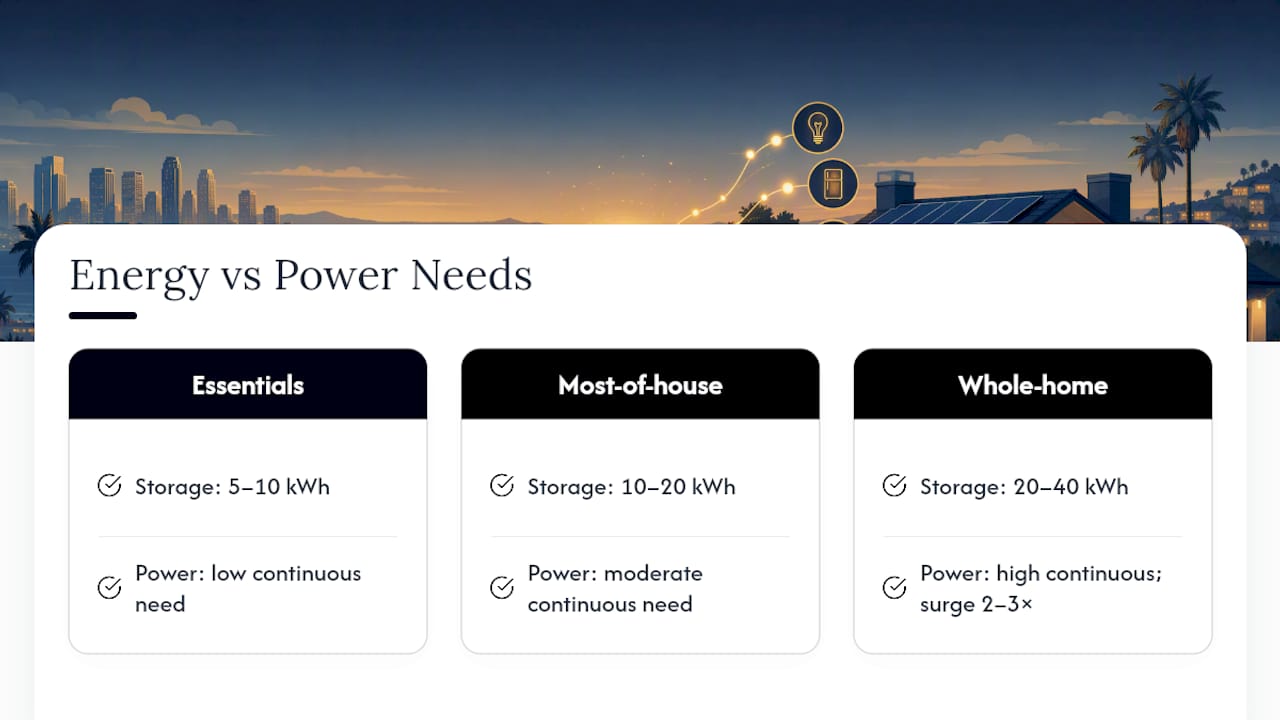
Most single residential battery units deliver 5 to 11.5 kW of continuous output, which is why whole-home ambitions often require stacking more than one unit, not because you need more stored energy but because you need more simultaneous power.
Pro Tip: Pull up your utility bill and note your peak demand charge or your highest single-hour usage, if it’s listed. That number tells you more about the kW you need than your average monthly usage ever will.
If your home runs on solar, daily recharging can shrink the battery bank needed for multi-day resilience, since the system tops off capacity each sunny day instead of relying purely on stored reserves.
How Much Does Whole Home Backup Cost?
Price ranges swing hard depending on how much of the house you’re actually covering, and vague online estimates rarely separate these tiers cleanly.
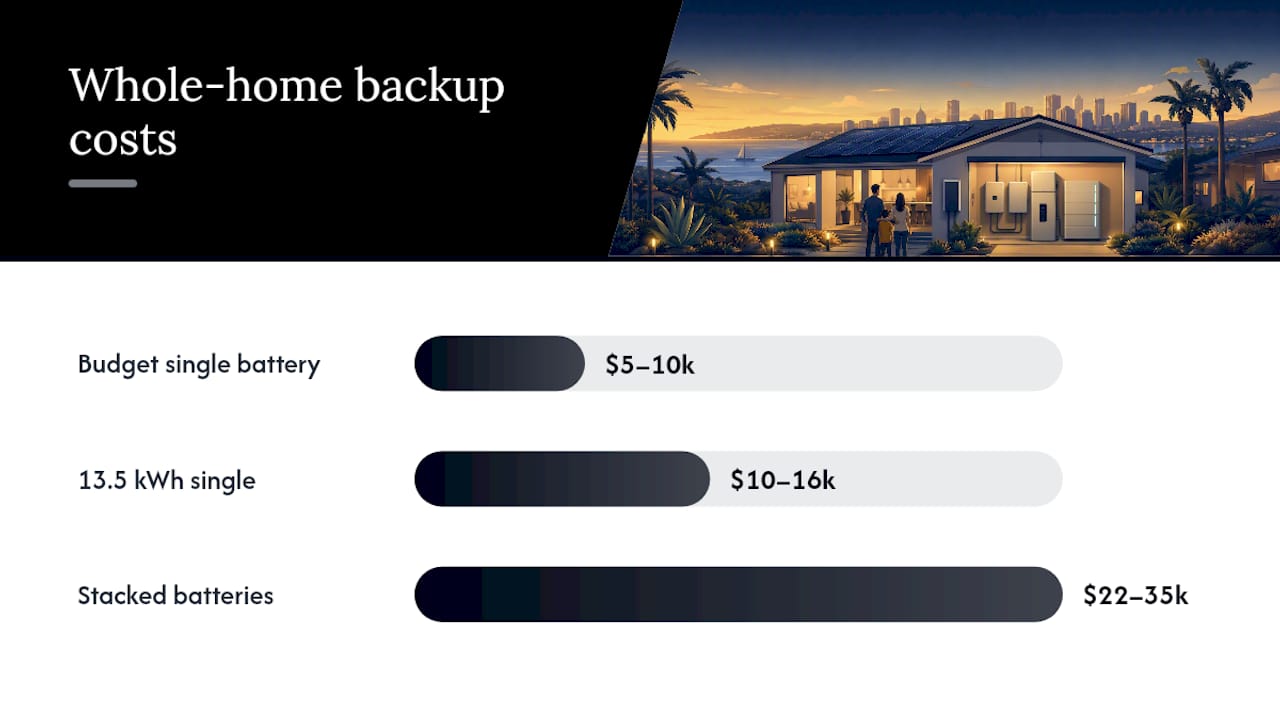
A single 13.5 kWh battery for essential loads generally runs $10,000 to $16,000 installed. Budget-tier single-battery setups can come in lower, around $5,000 to $10,000, depending on the brand and site conditions. Once you’re stacking two or more batteries for genuine whole-home coverage, installed totals commonly land in the $22,000 to $35,000 range, and can push toward $40,000 with a full smart gateway and load management hardware.
What actually drives that number:
- Batteries themselves — the biggest line item, scaling directly with kWh capacity
- Inverter and gateway hardware — the brains that manage switching and load shedding
- Labor — electrical work, mounting, wiring to the main panel
- Permits and inspections — required by your local jurisdiction before the system goes live
- Panel upgrades — needed if your existing main panel can’t support the new load
Federal incentives still cover a meaningful share of battery storage installation costs, but changes to the federal credit structure after 2025 have shifted more of the weight onto state and utility-level programs. That makes checking your specific state and utility offerings more important than it used to be, not less. San Diego homeowners can review current California solar incentives to see what actually applies to a battery-inclusive project right now.
Financing options, including prepaid leases, can lower the upfront cash needed without changing the underlying system size. Whether the investment pencils out depends heavily on your outage frequency and utility rate structure, something worth running the numbers on before committing to a specific kWh target. A closer look at whether a solar battery is worth it for your situation is worth doing before you get quotes.
What Happens During Installation, and How Long Does It Take?
A competent installer doesn’t just show up with batteries. The site assessment comes first, and it determines almost everything about the final scope and price.
- Panel and main breaker review. Your installer checks whether your existing electrical panel can handle the new equipment or needs an upgrade first.
- Mounting space and clearance check. Batteries need dedicated wall or floor space, often in a garage or exterior wall location, with code-required clearances.
- Ventilation and environmental assessment. Some battery chemistries have temperature and airflow requirements that rule out certain locations.
- Permitting and utility interconnection filing. Your installer submits plans to the local building department and your utility for sign-off before work begins.
- Installation and wiring. Electricians mount the hardware, wire it into the panel, and install the automatic transfer switch or gateway.
- Inspection. A local inspector verifies the work meets electrical and fire code before the system is allowed to operate.
- Commissioning and testing. The installer runs a simulated outage to confirm the transfer switch and load management work as designed.
Automatic transfer switches detect a grid failure and flip to battery power in 20 to 50 milliseconds, fast enough that most electronics never notice the gap. That switchover speed is a core part of what you’re paying for, not just the batteries themselves.
From initial consultation to full commissioning, a straightforward project typically runs a few weeks. Add several more weeks if a main panel upgrade is required, since that adds a separate utility approval step.
Battery Backup vs. Generators: Which Makes More Sense?
Neither option wins outright. It comes down to how long your outages typically last and how much noise and maintenance you’re willing to tolerate.
Battery systems switch on silently and instantly, with no fuel to store, no exhaust, and none of the maintenance a combustion engine demands. Their limit is runtime: once the stored energy is gone, you’re waiting on solar recharge or grid restoration, unless you’ve built in enough capacity to bridge multiple days.
Standby generators, especially whole-house propane or natural gas units, can run indefinitely as long as fuel keeps flowing. They’re noisier, require regular maintenance (oil changes, load testing, and periodic service calls), and involve combustion, which brings ventilation and code requirements batteries don’t have.
- Short outages (hours): batteries handle this cleanly with zero noise and no gap in power.
- Multi-day outages: a generator, or a battery paired with solar recharge, holds up better without needing a massive battery bank.
- Cost per usable hour: generators are often cheaper per hour of extended runtime, but batteries win on convenience and zero ongoing fuel cost for shorter events.
A hybrid approach, battery for instant and silent coverage of the first hours, generator for anything that stretches past a day or two, is often the most practical answer for homes in areas with frequent but usually short outages. If your region regularly loses power for a week at a time, a generator remains the more realistic backbone, with a battery layered on top for the quiet, instant handoff.
How to Choose an Installer and What to Ask For
The gap between a good bid and a bad one usually isn’t visible until the power goes out and something doesn’t work the way you were told it would.
- Demand a documented load audit, not a rough guess based on square footage. Your installer should walk through your actual circuits and appliances.
- Get exact kWh and kW specs in writing, including both continuous and surge power ratings for the inverter or gateway.
- Confirm the transfer switch or gateway approach and ask how load shedding works if you’re not getting a true whole-home system.
- Ask for a commissioning and testing plan, including a simulated outage test before they consider the job done.
- Review warranty and service terms for both the battery hardware and the labor, separately.
Red flags worth walking away from: vague runtime claims without specific kWh numbers attached, no mention of permits or inspections, and any installer who can’t clearly explain what happens to your AC or range circuits during an outage. A gateway with dynamic load shedding can deliver whole-home-feeling performance at a lower installed cost than a massive battery bank, but only if the installer configures load priorities correctly and tells you exactly which circuits get shed first.
Pro Tip: Ask every bidder for the same load audit in writing before comparing prices. Two quotes that look close on cost can represent very different systems if one skipped the audit entirely.
An itemized proposal should separate battery cost, inverter/gateway cost, labor, permits, and any panel upgrade, line by line, not bundled into one number you can’t verify.
How Long Do Whole Home Backup Systems Last?
Most lithium-based home batteries are warrantied for 10 years, and many installations continue performing well beyond that with gradual capacity loss rather than sudden failure. Expect usable capacity to decline gradually each year as the battery cycles through charge and discharge, which is normal chemistry, not a defect.
Maintenance is lighter than most homeowners expect. There’s no oil to change and no fuel system to service. What actually matters is periodic firmware updates (usually handled remotely by the manufacturer), keeping the unit’s ventilation area clear of debris, and an annual visual inspection of connections and mounting hardware.
Inverters and gateways tend to have shorter practical lifespans than the batteries themselves, often needing replacement or major servicing somewhere in the 10 to 15 year range depending on usage. Ask your installer directly what happens when that component ages out. If the system was sized correctly at installation, with power (kW) and energy (kWh) requirements matched to actual home needs, the batteries themselves should carry the household through outages reliably for a decade or more without a capacity crisis. Systems installed too small at the outset tend to show their age faster, since they’re already running near their limits during normal, non-emergency use.
Why Do Backup Systems Fail When You Need Them Most?
The most common failure isn’t a broken battery. It’s a system that was undersized for the actual electrical draw, and that flaw sits invisible until the exact moment you need it to work.
Circuit tripping during an outage usually means the surge power needed to start a motor, an AC compressor or well pump, exceeded what the inverter could deliver. The fix is either upgrading inverter capacity or moving that circuit to a load-shed priority so it doesn’t try to start during peak demand.
Shorter runtime than expected often traces back to a load audit that missed real-world usage. Homeowners frequently underestimate how much they actually run during a normal day, and an outage doesn’t change those habits.
Gateway or app connectivity issues are common with whole-panel systems that rely on Wi-Fi or cellular data for monitoring. A hardwired connection where possible reduces the odds of losing visibility right when you need it.
Transfer switch delay or failure is rare with modern hardware, since automatic transfer switches complete the handoff in 20 to 50 milliseconds, but a poorly wired or outdated switch can cause a noticeable flicker or dropout. If you notice this, it’s worth having an electrician verify the switch itself rather than assuming the battery is at fault.
Most of these issues trace back to sizing decisions made before installation, which is exactly why a thorough load audit upfront matters more than any single piece of hardware.
How San Diego Solar Approaches Whole Home Backup Projects
We size every battery system around a real load audit, not a template. That means walking your panel, checking continuous and surge draw on major appliances, and matching the result to a kWh and kW target before we ever talk equipment brands.
Our in-house crews handle engineering, permitting, and installation without subcontractors, which keeps the timeline predictable and the accountability in one place if something needs adjusting after commissioning. We work with Tesla Powerwall, Enphase IQ, and Franklin WH systems, choosing based on your home’s electrical profile rather than pushing one brand for every project.
A prepaid lease program can lower the upfront cash needed for a whole-home setup, and the federal tax credit still applies to battery storage and installation costs. For homeowners weighing whether to phase a system or size it correctly the first time, we’ve found buying the full stack upfront avoids the added permitting and labor costs that come with adding batteries later.
— Curtis Williamson
Get a Free Load Audit and Sizing Estimate
San Diego Solar is the local alternative to guessing at your own battery specs off a generic online calculator. We send an engineer to walk your actual panel and appliances, not a sales rep with a script, and hand you a real kWh and kW target before you spend a dollar on equipment.

Our free consultation includes a load audit, ballpark sizing across Tesla Powerwall, Enphase IQ, and Franklin WH options, and a written timeline covering permitting through commissioning. Every install carries manufacturer warranties up to 25 years, backed by a company with extensive experience and in-house crews. If you’re ready to see real numbers for your home instead of a national average, visit our solar battery storage page and request your free consultation today.
Sources
Sizing and cost figures draw from Earth Energy Log’s 2026 whole-home backup breakdown, EnergySage’s battery cost analysis, and Watt Wise’s 2026 cost breakdown. For local specifics, see San Diego Solar’s battery storage page, California incentives guide, and Powerwall sizing guide.
- Automatic transfer switch home backup guide — EcoFlow Energy
- Whole-home battery backup: what it really takes (and costs) in 2026 — Earth Energy Log
- How much do batteries cost? — EnergySage
- Home Battery Cost Breakdown 2026 | Watt Wise